

Making Different Displays Match: Why Standard-Gamut Calibration Falls Short and What a Common Gamut Solves
A finding has to look the same on every screen it is reviewed on. That is the quiet contract behind every multi-monitor workstation, every reading room, every soft-proofing booth: the color a clinician, a retoucher, or a designer sees on one display must be the color the next person sees on the one beside it. When the displays are identical, that contract is easy to honor. When they are not, it becomes the central problem of color management — and the way it is usually solved quietly throws away part of what the panels can show. This paper looks at why matching is easy in the identical case, why it breaks the moment the panels differ, what the conventional fix costs, and how extracting a common gamut from the displays themselves keeps the match without paying that cost.
The easy case: same model, same panel
Start with the situation everyone wishes they had. Two displays, both the same model — call it the X1232 — built on the same panel, driven by the same backlight. They leave the factory with the same native primaries, the same native white, the same transfer behavior, give or take unit-to-unit variation and the drift that comes with hours on the clock.
Calibrate both with a tool such as PerfectChroma to the same targets — the same white point and correlated color temperature, the same maximum luminance, the same luminance response curve — and the result is genuinely good. Put the two side by side and no difference is visible. The reason is that the two panels share the same set of reproducible colors. They have the same gamut. Calibration only has to correct each unit to a common, agreed transfer behavior, and because both panels can physically reach every color the other can, nothing has to be given up to make them agree. The match is exact because the hardware was never in conflict to begin with.
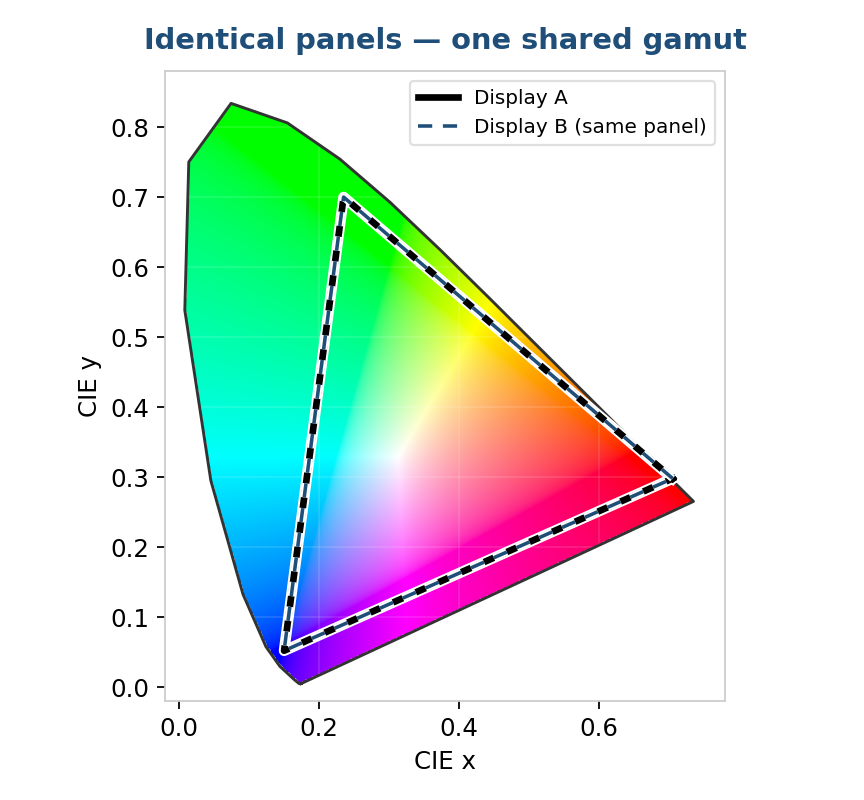
Figure 1. Two units of the same panel share one gamut. The same input color maps to the same point on both, so matching costs nothing.
Why different panels break the match
Now change one variable. Three displays, three different models, three different panels. Their gamuts may be very similar in overall size — none is simply “wider” or “narrower” than the others — but they are shaped differently. One panel reaches a little further into the reds, another holds a more saturated green, a third lays down a deeper blue, and each gives up a little ground in the directions where its neighbours are strong. Calibrate all three to the same white point, the same maximum luminance, and the same luminance response, exactly as before. The grays will line up. The whites will line up. And the colors will still not match.
The reason is gamut. White point, luminance, and the tone response govern the neutral axis and the brightness behavior of a display, but they say nothing about how far the panel can push a saturated red, a deep green, or a vivid cyan. Each panel’s gamut is fixed by its primaries — the chromaticities of its red, green, and blue subpixels, set by the backlight spectrum and the color filters. Because those primaries differ, each panel can reach some saturated colors its neighbours cannot, and cannot reach some that they can — and no panel can be told to produce a color beyond the physical chromaticity of its own subpixels. The differences run in different directions, not along a single axis from small to large. Matching the grayscale of three differently shaped gamuts leaves their saturated colors as far apart as they ever were: the same encoded red lands at three different places on three screens.
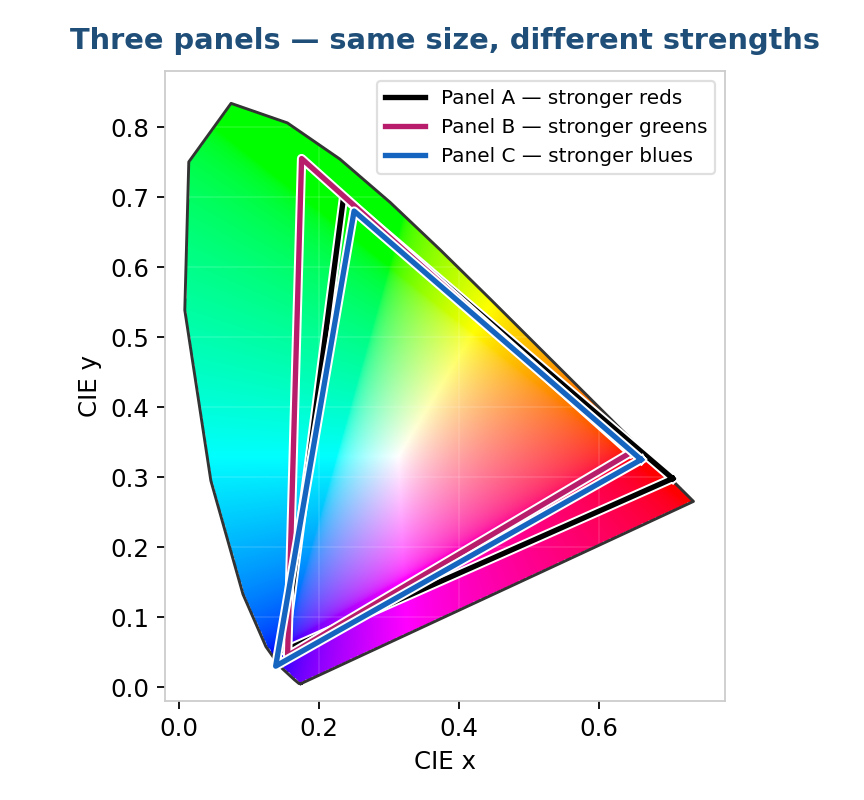
Figure 2. Three panels of comparable gamut size, each stronger in a different direction — one in the reds, one in the greens, one in the blues. Matching white and brightness does not bring their saturated colors together.
The standard-gamut fix — and the color it costs
The conventional answer is to stop letting each panel use its native primaries and instead calibrate all of them to a shared standard gamut — sRGB, for instance, or Rec. 709, or DCI-P3. A capable calibration tool can do this: in addition to white point, luminance, and response, it remaps each display so that its red, green, and blue land on the standard’s defined primaries. If every display is brought to the same standard gamut as well as the same white and tone curve, then in principle the same input color produces the same output color on all three. The match is restored.
But there is a cost, and it falls in a particular way. To pull a panel onto a standard gamut, the calibration has to map the panel’s native primaries to the standard’s primaries — and wherever a panel reaches further than the standard, that map clips the color inward and the extra reach is thrown away. Because each of our three panels extends past the standard in a different direction, each loses its own particular strength: the panel with the better red has its reds pulled in, the one with the better green loses green headroom, and so on. Worse, the standard often sits inside the region all three panels can actually reach together — so colors that every display could have shown in agreement are discarded simply because they fall outside sRGB. And in any direction where even one panel cannot reach the standard’s corner, the target has to be drawn in to whichever panel falls shortest there, shrinking it further still.
So the standard-gamut approach trades color for consistency. It buys a match, but it buys it against a triangle chosen in the abstract, with no regard for what these particular panels happen to share. The result looks consistent, but it does not look great, and measurable color range has been thrown away on the way — often far more than the matching actually required, including colors all three panels had in common.
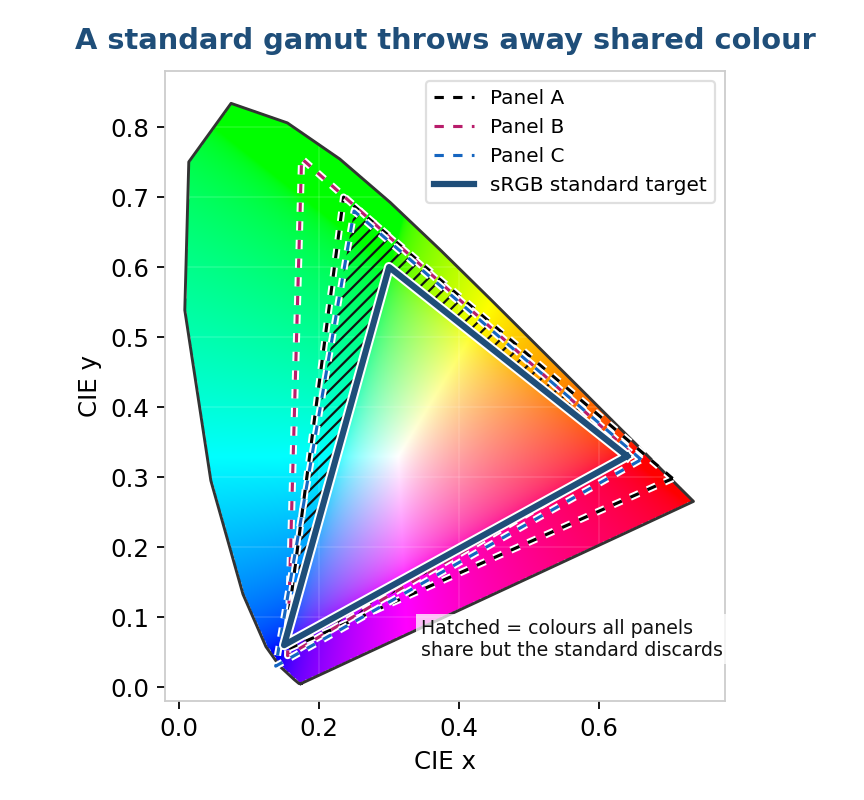
Figure 3. The standard gamut (sRGB) sits partly inside the region all three panels can reach. The hatched area is color every panel could have shown in agreement, discarded only because it falls outside the standard.
The better target: a gamut the displays already share
The key observation is that a standard gamut is an arbitrary target. It was not derived from the displays in front of you; it was defined years ago for an entirely different purpose. There is no reason to believe sRGB or Rec. 709 lines up with what your three specific panels can all reproduce. Almost always it does not — in some directions it asks for colors a panel cannot reach, and in others it discards colors that all three panels could have shown together.
The color volume that matters for matching is the intersection of the panels’ native gamuts: the set of colors that every display in the group can physically reproduce. Any color inside that intersection can be shown identically on all of them, with no panel being asked to do something it cannot. Any color outside it cannot be matched, because at least one panel cannot reach it. The intersection is, by definition, the largest gamut on which a perfect match is possible. Target anything smaller and you are discarding matchable colors for nothing; target anything larger and the match breaks in whatever direction a panel falls short. The common gamut is the optimum, and it depends entirely on which panels are actually in the group — something no fixed standard can know.
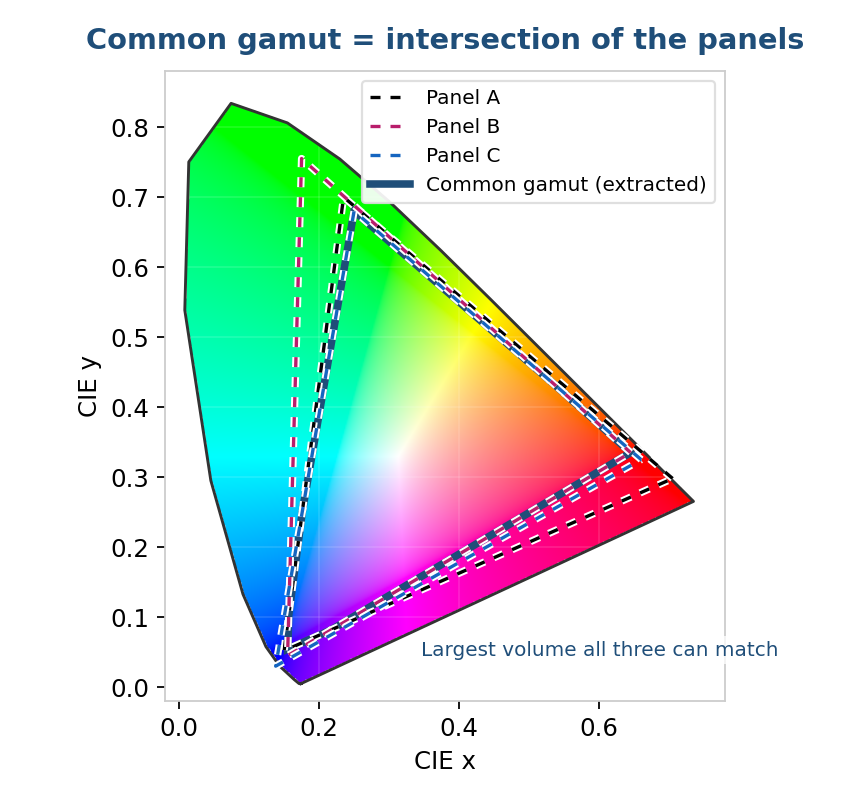
Figure 4. The common gamut extracted from the three panels (shaded) is their intersection — the largest volume all three can match, and the minimum-loss target.
The PerfectChroma Gamut Extractor
This is what the PerfectChroma Gamut Extractor is built to do. Rather than measuring each display against an external standard, it begins by characterizing each display as it actually behaves — building a full 3D color profile of every panel. A 3D profile is not the three-primaries-and-a-curve approximation of a classical matrix profile; it is a volumetric description of the device’s real reproduction, capturing the actual shape of each panel’s gamut across the whole color space, including the non-idealities — non-linearity, channel crosstalk, the way real primaries bend away from their nominal positions — that a matrix model glosses over.
With a true 3D profile of each display in hand, the Gamut Extractor computes the color volume they have in common — the intersection of the measured gamuts — and derives a single shared target gamut from it. It then generates a new device profile for each display that maps that common gamut onto the panel, so that every display reproduces the same colors in the same places. Because the shared target was extracted from the panels themselves rather than imposed from outside, the remapping each display has to undergo is the smallest one capable of producing a match. No panel is dragged onto a triangle far from its native behavior; none is asked for a color it cannot make; and no matchable color is discarded to satisfy a standard that none of the panels needed to meet.
That per-display correction is carried by a 3D LUT — a three-dimensional look-up table indexed by input R, G, and B together. Unlike a one-dimensional tone curve or a 3×3 matrix, which can only reshape each channel independently and assume the panel is perfectly additive, a 3D LUT maps every input color to an explicitly chosen output color across the whole volume. That is exactly what is needed here: bringing a panel onto the common gamut means moving different colors by different amounts in different directions — pulling in an over-strong red here, holding a green steady there, correcting crosstalk and non-linearity along the way — and only a full 3D mapping can express that. Each display receives its own 3D LUT, computed so that the same input color emerges identical on all three, delivered through the display’s internal hardware, a calibrated pipeline, or a color-managed application.
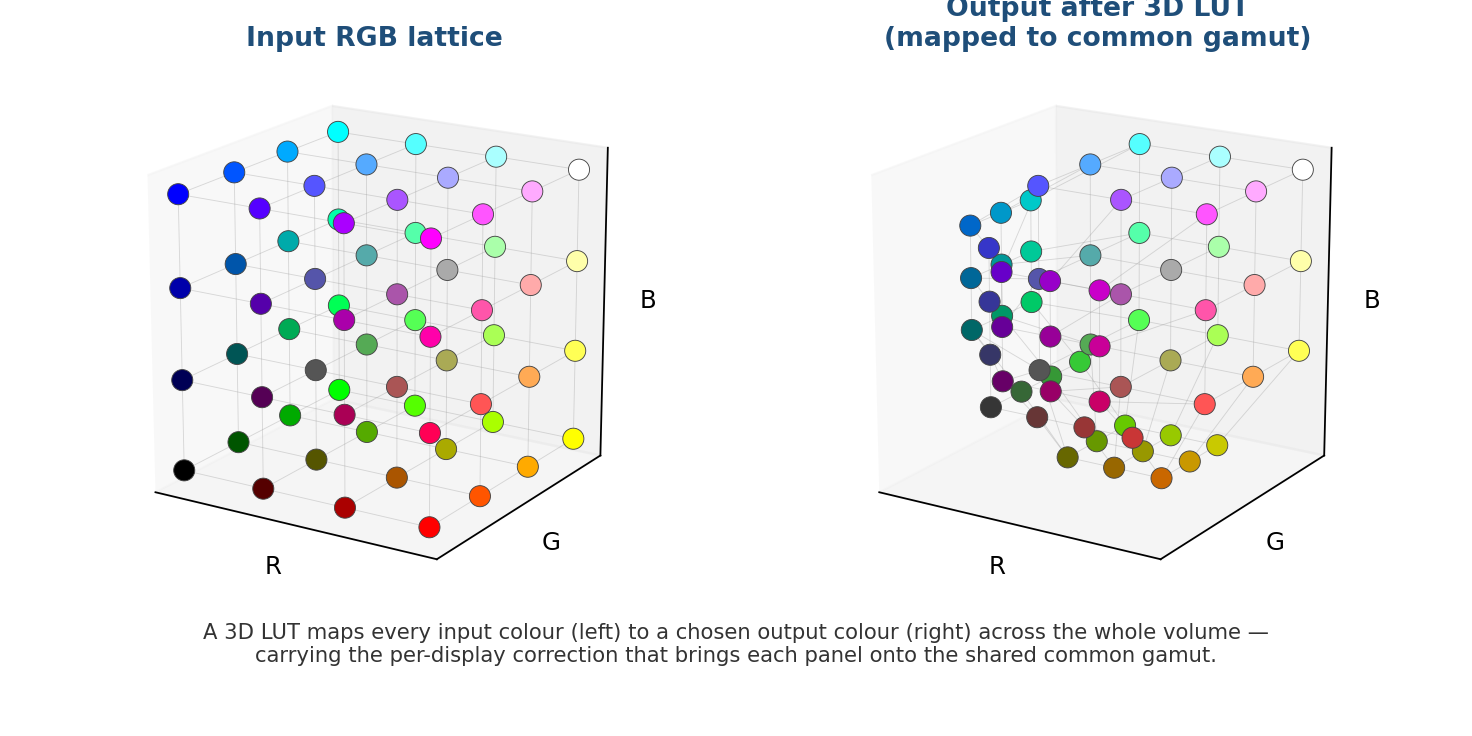
Figure 5. The correction is a 3D LUT: every input color in the RGB cube (left) is mapped to a chosen output color (right). This is what brings each panel onto the shared common gamut, color by color, across the whole volume.
The outcome is the one the identical-panel case delivered for free, recovered for a mixed fleet: all displays look the same, and the color lost in achieving that match is reduced to the minimum the hardware actually forces. What had to be given up to reach an arbitrary standard gamut is given back, except for the irreducible part — the colors that genuinely cannot be shown on all the panels at once.
Why this minimizes the loss
It is worth being precise about the claim, because “less loss” is easy to assert and easy to overstate. The loss in any matching scheme is the difference between what a panel can natively show and what the shared target lets it show. When the shared target is a standard gamut, that difference includes two things: the colors that genuinely cannot be matched across the group, and the colors that could have been matched but fall outside the standard anyway. The first part is unavoidable. The second part is pure waste — color sacrificed not to achieve the match but merely to honor a target chosen without reference to the actual hardware.
Extracting the common gamut eliminates the second part. Because the target is the intersection of the real gamuts, every color that all panels can show together is inside the target and is preserved; only the genuinely unmatchable colors are lost. That is the theoretical floor on loss for a perfect match, and it is the floor precisely because the target was derived from the displays rather than declared in advance. A standard gamut can only equal this floor by lucky coincidence — if it happened to land exactly on the panels’ intersection — and in practice it never does.
Practical considerations
A few honest qualifications keep this from sounding like a free lunch. The common gamut is only as good as the profiles it is built from, so the displays must be measured accurately and re-measured as they age and drift; a profile taken at installation will not describe the same panel two years and several thousand hours later. The intersection also depends on the membership of the group — add a fourth, narrower panel and the common gamut shrinks to accommodate it, which is the correct behavior but worth anticipating when planning a fleet. And like any gamut-shaping calibration, the correction has to be delivered where it will actually be applied — through the display’s internal processing, a calibrated pipeline, or a color-managed application — so that every image benefits rather than only those few applications that read an ICC profile. None of these caveats change the core result; they are the operational discipline that lets it hold over time.
Conclusion
Matching identical displays is easy because they share a gamut and nothing has to be surrendered to make them agree. Matching different panels is hard because their gamuts differ, and the brightness-and-white-point calibration that suffices for identical units leaves their saturated colors scattered. The usual remedy — calibrating everything to a standard gamut — restores the match but pays for it by clipping every panel to an arbitrary triangle, discarding color that the match never actually required. The PerfectChroma Gamut Extractor changes the target from an external standard to the panels’ own common gamut: it builds a full 3D color profile of each display, computes the largest color volume they can all reproduce, and generates per-display profiles that map that shared volume onto every screen. The displays match, and the color given up is held to the minimum the hardware genuinely imposes — no more thrown away to satisfy a standard the panels were never built to meet.
References
CIE — CIE 1931 / 1976 chromaticity, CIELAB color space, and standard illuminants.
ICC — International Color Consortium, ICC profile specification, including A2B/B2A multidimensional LUT tags (color.org).
IEC 61966-2-1 — sRGB default RGB colour space.
ITU-R BT.709 / SMPTE / DCI-P3 — standard display color gamuts.
Writes about display calibration and the workflows that depend on accurate color. Part of the QUBYX team since 2018.
